Take5™ Connect allows you to create and manage charts to visualize data, making it easier to track progress, identify trends, and generate reports.
Managing notifications in Take5™ Connect helps you stay informed without being overwhelmed. This guide will show you how to enable or disable notifications
Adding a company logo to your Take5™ Connect account helps to personalize your account and make it easily identifiable. Follow these steps to
Designating a main contact in Take5™ Connect ensures that the correct person is responsible for key communications and decisions for your site or
Automatic sign-outs help ensure that workers are properly logged out from sites at the end of their shifts, improving accuracy and safety. This
Go to the Google Play Store for Android users. Search for Take5 Connect in the Google Play Store. For Apple IOS users Please
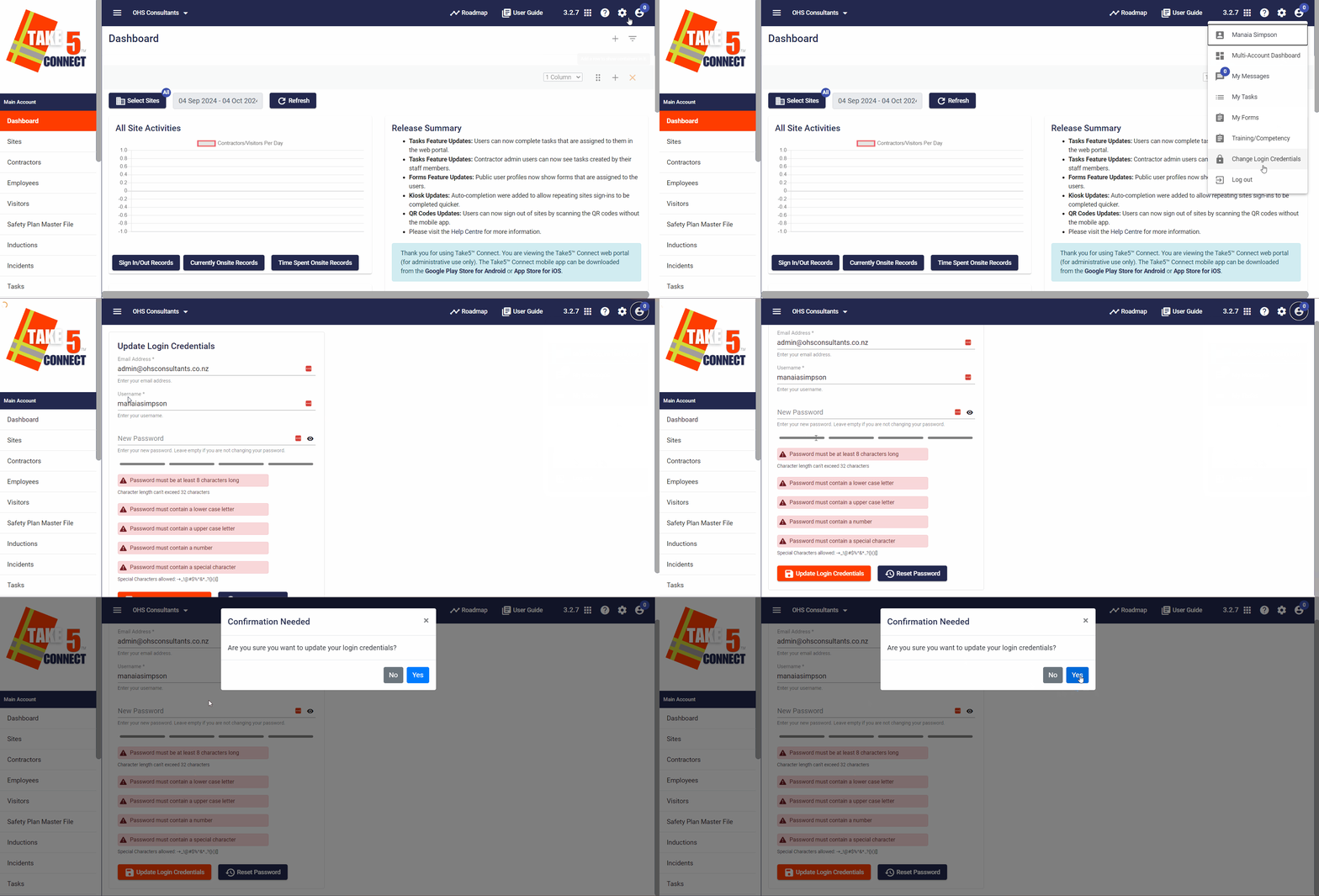
Updating your login credentials in Take5™️Connect ensures your account remains secure and up-to-date. This guide will walk you through the steps to change